ZHA Device Table Card
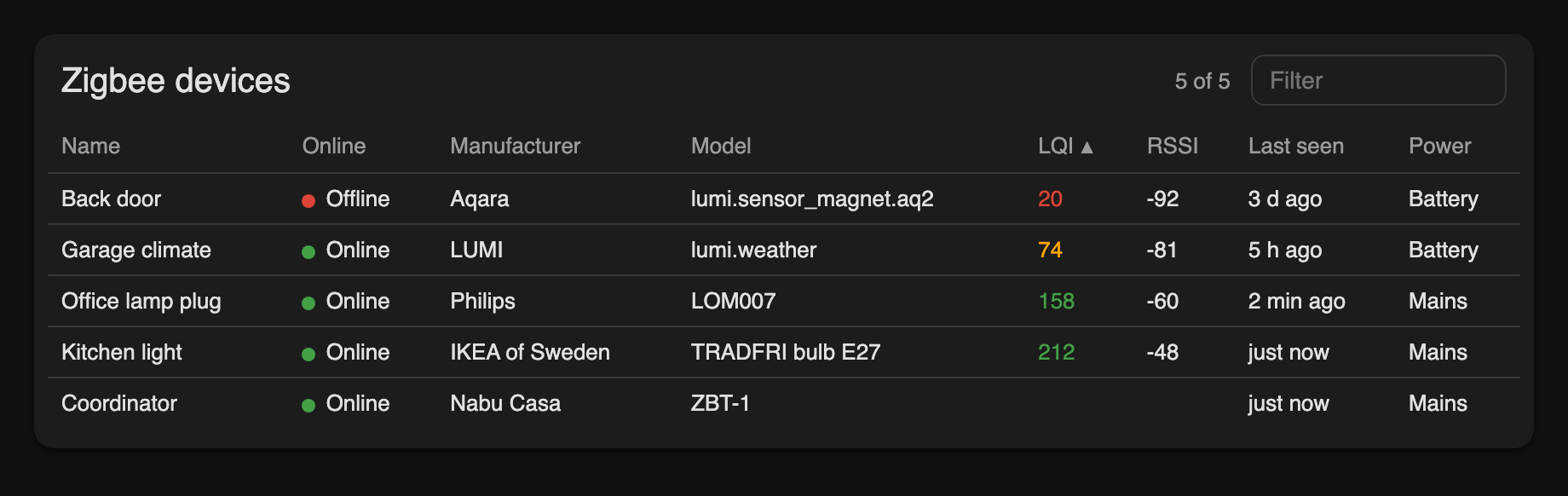
A sortable table of your ZHA (Zigbee) devices on a dashboard: name, online or offline, manufacturer, model, link quality (LQI), signal strength (RSSI), last seen and power source. Click a column header to sort, optionally filter by text, click a row to open that device's page. One JavaScript file, no dependencies, a visual editor included.
Free, MIT licensed. Version 1.0.1. Download zha-device-table-card.js (14 KB)
- Download zha-device-table-card.js.
- Copy it into
/config/www/dashpack/on your Home Assistant (create the folder if needed; restart once if/config/wwwdid not exist). - Turn on Advanced mode in your profile. Then Settings > Dashboards > three dots > Resources > Add resource: URL
/local/dashpack/zha-device-table-card.js, type JavaScript module. - Hard-refresh the browser (Ctrl+Shift+R / Cmd+Shift+R). The card is now available as
custom:zha-device-table-card.
How it works
The card sends the ZHA websocket command zha/devices through Home Assistant's hass.callWS and shows what comes back. It asks once when the card loads and then every refresh_seconds (default 60, minimum 10); only one request is in flight at a time, and if an update fails the last good table stays visible with a short notice. This is an internal Home Assistant command, so it could change between releases. You need the ZHA integration set up (Zigbee2MQTT and other integrations are not supported).
Use
Add the card from the card picker ("ZHA Device Table Card") or in YAML:
type: custom:zha-device-table-card
title: Zigbee devices
sort_by: lqi
show_search: true| Option | Default | Description |
|---|---|---|
title | ZHA devices | Card heading. |
columns | name, available, manufacturer, model, lqi, rssi, last_seen, power_source | List of column keys, or {key: ieee, name: Address} to rename one. |
sort_by | name | Column key to sort by at start. Empty values sort last. |
sort_dir | asc | asc or desc. |
show_search | false | Show a filter box (matches name, manufacturer, model, IEEE, quirk). |
clickable | true | Clicking a row opens the device page. Devices without a registry id are not clickable. |
refresh_seconds | 60 | How often to ask ZHA again. |
max_height | none | Maximum table height in pixels; scrolls beyond that. |
lqi_warn / lqi_bad | 100 / 50 | LQI below these is shown orange / red. |
Column keys: name, available, manufacturer, model, ieee, nwk, lqi, rssi, last_seen, power_source, quirk_class, area_id.
Example dashboard
A free sample view: a Zigbee health page with the table sorted worst signal first.
title: Zigbee
path: zigbee
cards:
  - type: vertical-stack
    cards:
      - type: markdown
        content: >
          Devices with an LQI under 50 or marked Offline are the ones to check:
          move a router closer, or re-pair the device.
      - type: custom:zha-device-table-card
        title: Zigbee health
        sort_by: lqi
        sort_dir: asc
        show_search: true
        max_height: 480
        columns:
          - name
          - available
          - lqi
          - rssi
          - last_seen
          - power_source
          - model
8 more ready-made views (living room, bedroom, kitchen, cameras, security, energy, mobile) are in the Home Dashboard Layout Pack ($9): https://dashpack.strahmdigital.com/
Migrating from custom:zha-network-card
Change the type to custom:zha-device-table-card and the resource URL to this card's file. The old card's columns used attr/prop/modify and templated cell contents; this card uses fixed column keys (listed above) instead, so rewrite columns as a list of keys. clickable carries over. sort_by takes a column key.
License
MIT