Radio Picker Card
A Home Assistant dashboard card for web radio. Pick a speaker (Chromecast, Sonos, any media_player), tap a station and it plays there. The card highlights what is playing and has volume, mute and stop for the chosen speaker. Handy for multi-room: kids on one speaker, jazz in the kitchen. No dependencies, one JavaScript file, a visual editor included.
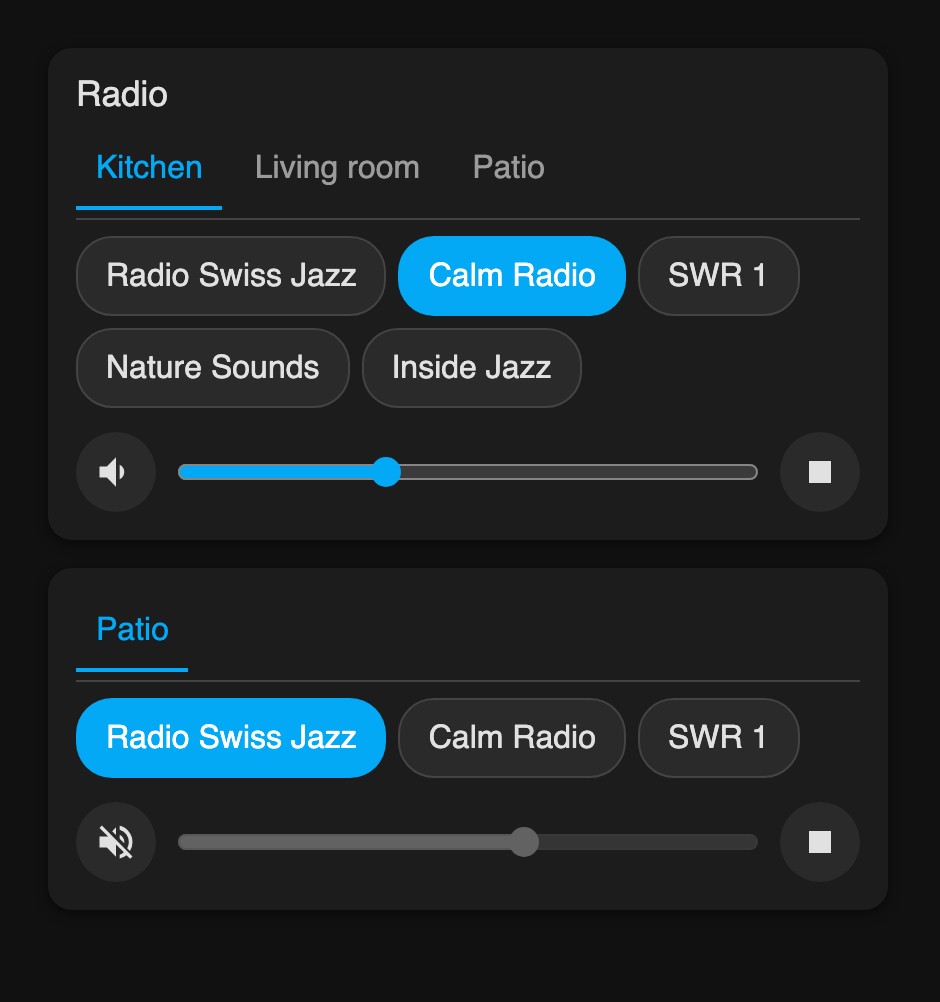
Free, MIT licensed. Version 1.0.0. Download radio-picker-card.js (11 KB)
- Download radio-picker-card.js.
- Copy it into
/config/www/dashpack/on your Home Assistant (create the folder if needed; restart once if/config/wwwdid not exist). - Turn on Advanced mode in your profile. Then Settings > Dashboards > three dots > Resources > Add resource: URL
/local/dashpack/radio-picker-card.js, type JavaScript module. - Hard-refresh the browser (Ctrl+Shift+R / Cmd+Shift+R). The card is now available as
custom:radio-picker-card.
Use
Find stream URLs on radio-browser.info.
type: custom:radio-picker-card
title: Radio
entities:
  - media_player.kitchen
  - media_player.living_room
links:
  - name: Radio Swiss Jazz
    url: http://stream.srg-ssr.ch/m/rsj/mp3_128
  - name: Calm Radio
    url: http://streams.calmradio.com/api/43/128/stream/;?d=
The first speaker that is playing is selected when the card loads, otherwise the first in your list. Speakers that Home Assistant does not know are hidden, with a small note. If a speaker reports no volume, the volume slider and mute button hide for it.
| Option | Default | Meaning |
|---|---|---|
entities | required | media_player entities, as ids or as {entity: media_player.kitchen, name: Kitchen} to rename the tab. |
links | required | Stations: name and url. Optional media_content_type per station. stations is accepted as another name. |
title | Heading on the card. | |
media_content_type | audio/mp4 | Content type sent with play_media. Try music or audio/mpeg if a speaker will not play a stream. |
show_volume | true | Volume slider. |
show_mute | true | Mute button. |
show_stop | true | Stop button (enabled while playing). |
Stations are played with media_player.play_media, so anything your speaker accepts as a media id works (for example a Spotify URI on a speaker that supports it).
Example dashboard
title: Music
views:
  - title: Radio
    sections:
      - type: grid
        cards:
          - type: custom:radio-picker-card
            title: Whole house
            entities:
              - media_player.kitchen
              - media_player.living_room
              - entity: media_player.patio
                name: Outside
            links:
              - name: Radio Swiss Jazz
                url: http://stream.srg-ssr.ch/m/rsj/mp3_128
              - name: SWR 1
                url: http://swr-swr1-bw.cast.addradio.de/swr/swr1/bw/mp3/128/stream.mp3
              - name: Nature Sounds
                url: http://94.23.252.14:8067/stream
8 more ready-made views (living room, bedroom, kitchen, cameras, security, energy, mobile) are in the Home Dashboard Layout Pack ($9): https://dashpack.strahmdigital.com/
Coming from custom:jukebox-card
- Change
type: custom:jukebox-cardtotype: custom:radio-picker-card. - Keep your config: it works as is.
| Old option | Here |
|---|---|
entities | entities (same) |
links (name, url) | links (same) |
(always audio/mp4) | media_content_type, default audio/mp4 |
New: title, renaming speaker tabs, per-station content type, hiding volume, mute or stop, and a visual editor.
Differences: the look is not pixel-identical, and the old card's behaviour of sending every station as audio/mp4 is kept only as the default. Speakers that are unavailable are hidden instead of logging to the console.
This project is not affiliated with the author of that card.
Testing
20 jsdom tests run against a mocked hass (npm test): config validation and the stations alias, tabs and station buttons, speaker auto-selection, play_media calls with default and custom content types, switching speakers, volume commit and mid-drag updates, mute, stop, highlight updates without rebuilds, speakers without volume, hidden controls, missing entities, and text escaping. A headless Chrome screenshot of the test page was checked by eye. Not tested: a real Home Assistant instance, real speakers (so whether a given speaker accepts a stream with the default content type is untested), and the visual editor inside the real dashboard editor.