Media Shelf Card
A card that shows the library of a media player, such as your playlists, as a grid of covers (or a list). Pick a speaker, tap a cover, it plays. A small "now playing" strip with previous, play/pause and next sits on top. No dependencies, one JavaScript file, a visual editor included.
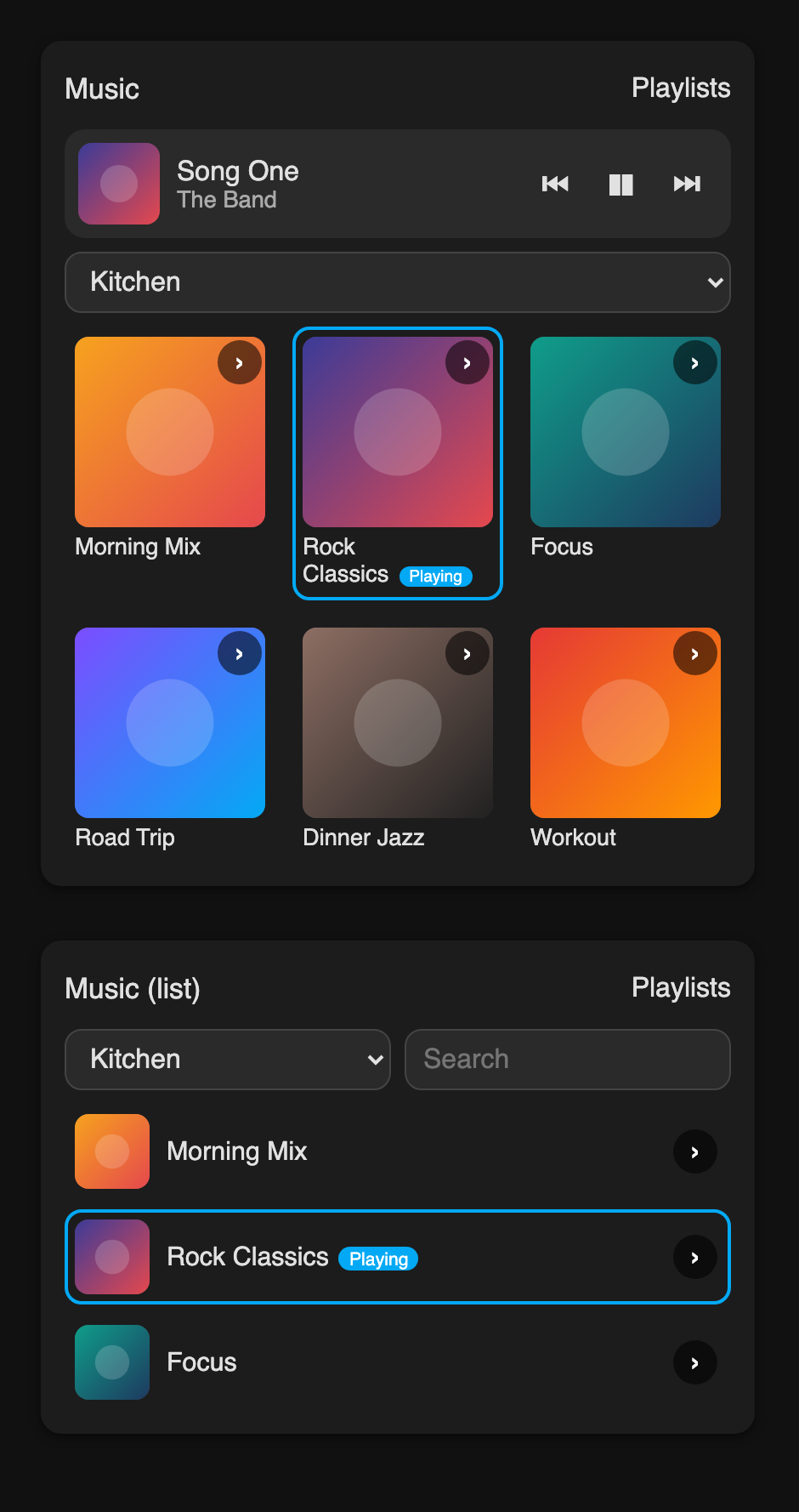
Free, MIT licensed. Version 1.0.0. Download media-shelf-card.js (19 KB)
- Download media-shelf-card.js.
- Copy it into
/config/www/dashpack/on your Home Assistant (create the folder if needed; restart once if/config/wwwdid not exist). - Turn on Advanced mode in your profile. Then Settings > Dashboards > three dots > Resources > Add resource: URL
/local/dashpack/media-shelf-card.js, type JavaScript module. - Hard-refresh the browser (Ctrl+Shift+R / Cmd+Shift+R). The card is now available as
custom:media-shelf-card.
Use
Add the card from the card picker ("Media Shelf Card") or in YAML:
type: custom:media-shelf-card
entity: media_player.spotify
category: playlists
columns: 3
limit: 12
default_device: Kitchen| Key | Description |
|---|---|
entity | Required. A media_player.* entity that supports browsing media. |
name | Title. Defaults to the entity name. |
category | Which section of the library to show. The card reads the root of the media browser and opens the first entry whose title, content id or content type contains this text (case-insensitive). Default playlists. Use featured for featured playlists, root (or all) to show the top level itself. If nothing matches, the top level is shown. |
view | grid (default) or list. |
columns | Covers per row in grid view, 1-8. Default 3. |
limit | Maximum number of items shown. Default 24. |
max_height | Height in pixels after which the items scroll. Default: no limit. |
search | true adds a search box that filters the loaded items by title. |
filter | Show only items matching at least one pattern. List of regular expressions, or a comma separated string. A pattern matches the whole title, case-insensitive. Prefix with title:, media_content_id:, media_content_type: or media_class: to match another field, for example media_content_id:spotify:playlist:abc.*. An invalid pattern is ignored. |
default_device | Name of the speaker (a source of the media player) to preselect. Otherwise the player's current source is used, then the first one. |
filter_devices | Hide speakers whose name matches a pattern (same format as filter, whole name). |
shuffle | true or false: call media_player.shuffle_set before playing. Leave out to not touch shuffle. |
show_now_playing | Show the now-playing strip while something plays or is paused. Default true. |
The speaker list is the source_list attribute of the media player. When you tap a cover and the chosen speaker is not the current source, the card calls media_player.select_source first, then media_player.play_media with the item's content id and content type. The item matching the media_playlist attribute of the player is outlined as "Playing" where the integration provides that attribute.
filter, filter_devices and shuffle are edited in YAML; the visual editor covers the other options and keeps those keys.
Example dashboard
A small sample view you can paste into the raw configuration editor (replace the placeholder entity ids with your own):
title: Music
path: music
type: sections
max_columns: 1
sections:
  - type: grid
    cards:
      - type: custom:media-shelf-card
        entity: media_player.spotify
        category: playlists
        columns: 3
        limit: 12
        search: true
      - type: grid
        columns: 2
        square: false
        cards:
          - type: tile
            entity: light.living_room
          - type: tile
            entity: climate.thermostat
          - type: tile
            entity: cover.garage_door
          - type: tile
            entity: lock.front_door
8 more ready-made views (living room, bedroom, kitchen, cameras, security, energy, mobile) are in the Home Dashboard Layout Pack ($9): https://dashpack.strahmdigital.com/
Coming from custom:spotify-card
That card (custom-cards/spotify-card) has not had a commit since May 2023 and its last release is from 2021. It needs the Spotify integration plus the separate spotcast integration, and its open issues describe the card stuck on "Loading..." (#182, #197 since Home Assistant 2023.3), an empty playlist list (#212) and "No devices found" (#219, 2025). This card is an independent rewrite with a different data path: it asks the media player itself for its library and does not need spotcast. Options carry over like this (names taken from that card's README):
- Change
type: custom:spotify-cardtotype: custom:media-shelf-card. - Map the options:
| Old option | Here |
|---|---|
spotify_entity | entity (required here; it is not auto-detected) |
name | name |
limit | limit |
height | max_height |
display_style: Grid | view: grid (or list) |
grid_covers_per_row | columns |
default_device / device | default_device |
filter_devices | filter_devices (whole-name patterns, same idea) |
| playlist filters | filter (same field:pattern idea; the fields are the browse item fields listed above) |
always_play_random_song | shuffle: true |
playlist_type: featured | category: featured |
playlist_type: discover-weekly, country_code | not supported (what the library offers depends on the integration) |
account, hide_warning, known_connect_devices | not supported (no spotcast; speakers come from the player's source list) |
- Check the layout: this card is a similar but not pixel-identical design.
Honest limits: speakers that are not in the media player's source_list cannot be chosen, and what appears in the library (playlists, featured, new releases, artists) is decided by the media player's integration, not by this card.