Light Controls Row
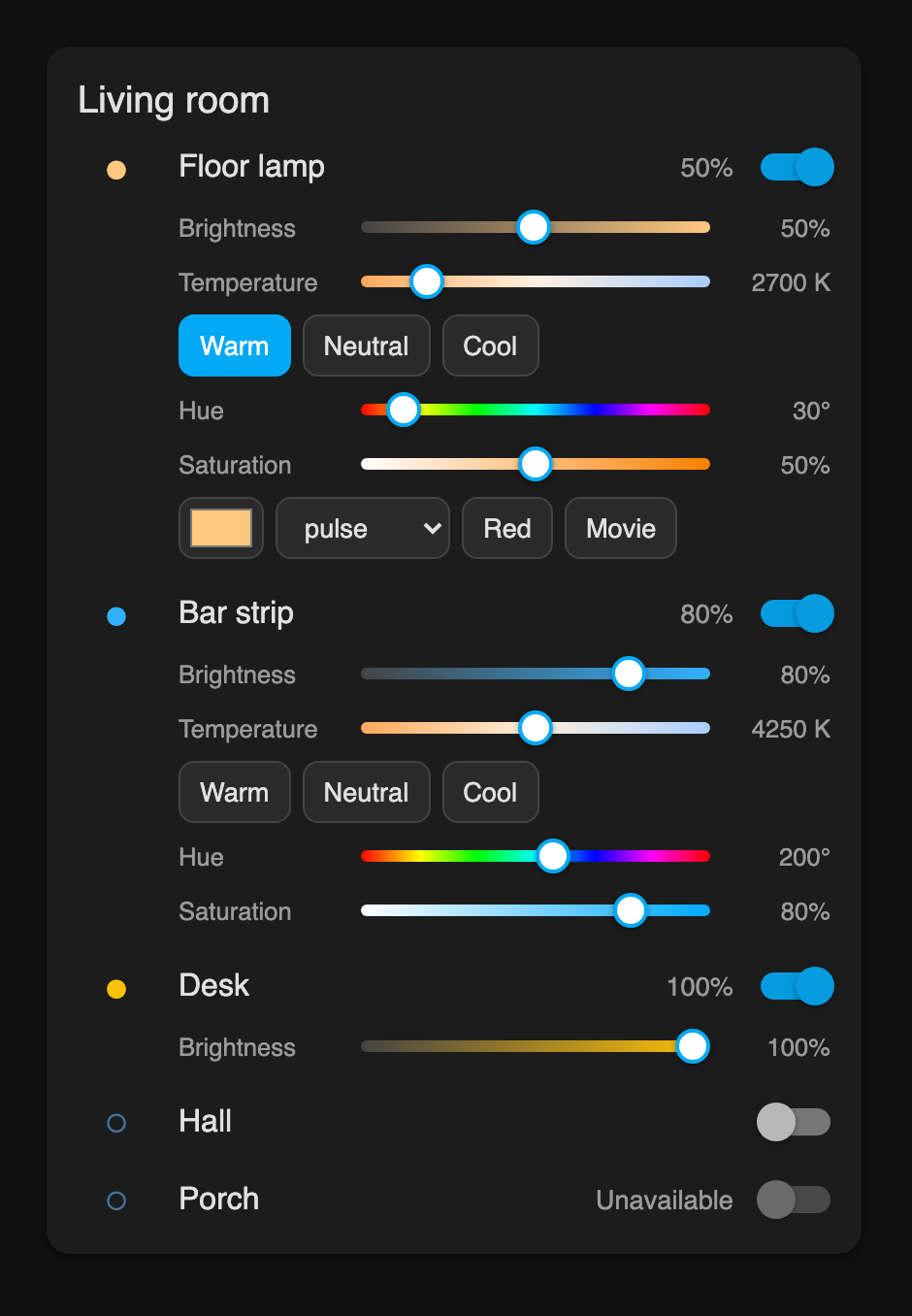
An entity row for lights in Home Assistant's entities card: the toggle, plus brightness, color temperature, hue and saturation sliders, a color picker, an effect list and your own quick buttons, right under the row. No dependencies, one JavaScript file.
Free, MIT licensed. Version . Download light-controls-row.js (16 KB)
- Download light-controls-row.js.
- Copy it into
/config/www/dashpack/on your Home Assistant (create the folder if needed; restart once if/config/wwwdid not exist). - Turn on Advanced mode in your profile. Then Settings > Dashboards > three dots > Resources > Add resource: URL
/local/dashpack/light-controls-row.js, type JavaScript module. - Hard-refresh the browser (Ctrl+Shift+R / Cmd+Shift+R). The card is now available as
custom:light-controls-row.
Use
This is a row, so it goes inside an entities card (YAML):
type: entities
title: Lights
entities:
  - type: custom:light-controls-row
    entity: light.lamp
  - type: custom:light-controls-row
    entity: light.color_lamp
    show_color_sliders: true
    show_color_picker: true
    buttons:
      - name: Red
        service_data:
          color_name: red
      - name: Movie
        service_data:
brightness_pct: 15| Key | Description |
|---|---|
entity | Required. A light.* entity. |
name, icon | Optional overrides. The icon turns to the light's color while it is on (color lights only). |
expand | on (default): controls show while the light is on. always: controls always show (disabled while off). tap: a small arrow on the row opens and closes them. |
show_brightness | Default true. Brightness slider (1-100 %, sent as brightness_pct) for any dimmable light. |
show_color_temp | Default true. Color temperature slider in Kelvin, using the light's own min and max, for lights that support color temperature. |
show_temp_buttons | Default true. Warm (2700 K), Neutral (4000 K) and Cool (6000 K) buttons, clamped to the light's range; the one within 50 K of the current value is highlighted. |
show_color_sliders | Default false. Hue and saturation sliders for color lights. |
show_color_picker | Default false. A color picker for color lights (sends rgb_color). |
show_effect | Default false. An effect drop-down when the light has an effect list. |
buttons | Up to 12 buttons. Each has a name and service_data, which is sent to light.turn_on for this entity together with entity_id. |
Tap the icon or name to open the light's more-info dialog. Sliders send their value when you release them, so dragging does not flood the light, and a state update arriving mid-drag will not move the slider under your finger.
The camelCase spellings showColorPicker, showColorSliders, showBrightness and showColorTemp are accepted as aliases.
There is no visual editor: Home Assistant's entities card edits custom rows as YAML.
Example dashboard
A small sample view you can paste into the raw configuration editor (replace the placeholder entity ids with your own):
title: Lights
path: lights
type: sections
max_columns: 1
sections:
  - type: grid
    cards:
      - type: entities
        title: Living room
        entities:
          - type: custom:light-controls-row
            entity: light.floor_lamp
            show_color_sliders: true
          - type: custom:light-controls-row
            entity: light.ceiling
          - type: custom:light-controls-row
            entity: light.reading
            expand: tap
      - type: grid
        columns: 2
        square: false
        cards:
          - type: tile
            entity: climate.thermostat
          - type: tile
            entity: cover.garage_door
          - type: tile
            entity: lock.front_door
          - type: tile
            entity: media_player.tv
8 more ready-made views (living room, bedroom, kitchen, cameras, security, energy, mobile) are in the Home Dashboard Layout Pack ($9): https://dashpack.strahmdigital.com/
Coming from custom:light-entity-row
That row (custom-cards/light-entity-row) has not been updated since early 2023. It still depends on Polymer, which Home Assistant removed in 2023.5, and its issues report that it stopped working (#25), that the slider disappeared (#20) and that it refuses to update (#23, #22). This row is an independent rewrite that accepts the same option names, so most configs work after changing the type:
- Change
type: custom:light-entity-rowtotype: custom:light-controls-row. - Options:
| Old option | Here |
|---|---|
entity, name, icon | same |
showColorPicker | show_color_picker (the old spelling works too) |
showColorSliders | show_color_sliders (the old spelling works too) |
buttons with name and service_data | same |
| temperature buttons | on by default (show_temp_buttons); values are my own (2700 / 4000 / 6000 K), not copied from the old row |
| (none) | new: expand, show_brightness, show_color_temp, show_effect, a Kelvin temperature slider |
- Check the look: the layout is similar in spirit but not pixel-identical, and the old option names come from its README, not from running it.
This project is not affiliated with the author of that row.
Testing
23 jsdom tests run against a mocked hass (npm test). The row was also loaded in a real Home Assistant 2026.11 with the demo lights: the brightness slider, hue slider and on/off toggle changed the real light states correctly (brightness 30 % became 76/255, hue 120 gave green RGB), the controls hid when the light turned off, and there were no console errors. Not tested: real hardware, or lights whose integration reports unusual color modes (for example xy-only lights, or Kelvin attributes missing); the effect drop-down and color picker were exercised in jsdom only, not in a real browser interaction.