Glance Weather Card
A compact weather card for Home Assistant: condition icon, current temperature, today's high and low, and a couple of details (rain, humidity, wind, pressure). Optional day/night colored backdrop. No dependencies, one JavaScript file, a visual editor included.
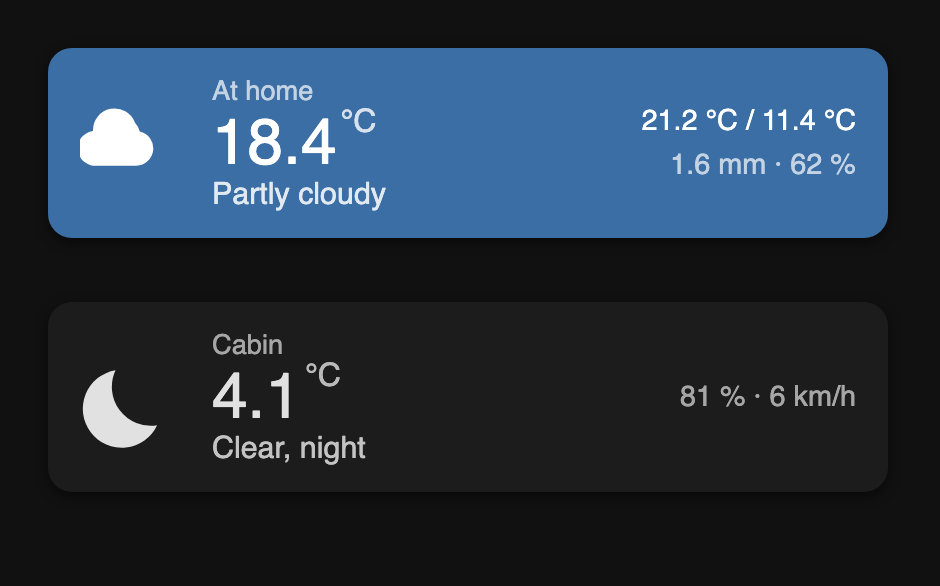
Free, MIT licensed. Version 1.1.0. Download glance-weather-card.js (19 KB)
- Download glance-weather-card.js.
- Copy it into
/config/www/dashpack/on your Home Assistant (create the folder if needed; restart once if/config/wwwdid not exist). - Turn on Advanced mode in your profile. Then Settings > Dashboards > three dots > Resources > Add resource: URL
/local/dashpack/glance-weather-card.js, type JavaScript module. - Hard-refresh the browser (Ctrl+Shift+R / Cmd+Shift+R). The card is now available as
custom:glance-weather-card.
Use
Add the card from the card picker ("Glance Weather Card") or in YAML:
type: custom:glance-weather-card
entity: weather.home
name: At home
primary_info: extrema
secondary_info: [precipitation, humidity]
backdrop:
  day: "#3b6ea5"
night: "#40445a"| Key | Description |
|---|---|
entity | Required. A weather.* entity. |
name | Text under the icon. Defaults to the entity name; use " " to hide it. |
primary_info, secondary_info | One key or a list of: extrema (today's high / low), precipitation, precipitation_probability, humidity, wind_speed, wind_bearing, pressure. Defaults extrema and precipitation. |
backdrop | true, or an object with day, night, text (CSS colors) and fade (boolean). Night is when sun.sun is below_horizon. |
custom | List of single-key objects pointing at your own sensors: temp, high, low, state, icon-state, precipitation, precipitation_probability, humidity, wind_speed, wind_bearing, pressure. |
tap_action | action: more-info (default), navigate (navigation_path), url (url_path), call-service / perform-action (service, service_data, target) or none. |
forecast_type | daily (default), hourly or twice_daily. Sent to Home Assistant's weather/subscribe_forecast; your weather integration must support that type. With hourly, the high / low shown is the min and max of the next 24 hours. |
forecast_count | How many forecast entries to show in a row under the card (0 to 24). Default 0 (no row, same as 1.0.0). forecast_hours (used with hourly) and forecast_days (other types) are accepted as aliases. |
wind_speed_unit | mph, km/h, m/s or kn. Converts the entity's wind_speed (using its wind_speed_unit attribute) and a wind_speed custom sensor. Default: show the entity's own unit. |
temperature_unit | °C or °F. Converts the temperature, high / low and the forecast row. Default: the entity's unit. |
Forecast row, wind and temperature units (1.1.0)
type: custom:glance-weather-card
entity: weather.home
forecast_type: hourly      # daily | hourly | twice_daily
forecast_count: 6          # entries in the row under the card
secondary_info: [wind_speed, humidity]
wind_speed_unit: mph       # mph | km/h | m/s | kn
temperature_unit: "°F"     # optional
Hourly labels use your Home Assistant profile's language, 12/24 hour setting and time zone. Daily labels are short weekday names; twice_daily entries for the night are marked with a moon. Each entry shows the condition icon and the temperature.
# Three-day outlook, units left as the entity reports them
type: custom:glance-weather-card
entity: weather.home
forecast_count: 3
Example dashboard
A small sample view you can paste into the raw configuration editor (replace the placeholder entity ids with your own):
title: Phone
path: phone
type: sections
max_columns: 1
sections:
  - type: grid
    cards:
      - type: custom:glance-weather-card
        entity: weather.home
        name: Now
        primary_info: extrema
        secondary_info: precipitation
        backdrop:
          day: "#3b6ea5"
          night: "#40445a"
      - type: grid
        columns: 2
        square: false
        cards:
          - type: tile
            entity: light.living_room
          - type: tile
            entity: climate.thermostat
          - type: tile
            entity: cover.garage_door
          - type: tile
            entity: lock.front_door
8 more ready-made views (living room, bedroom, kitchen, cameras, security, energy, mobile) are in the Home Dashboard Layout Pack ($9): https://dashpack.strahmdigital.com/
Coming from custom:simple-weather-card
That card (kalkih/simple-weather-card) has not had a release since 2023 and several users report it no longer renders on recent Home Assistant releases (for example its issues #80 and #82). This card is an independent rewrite that reuses the same option names, so most configs work after changing the card type:
- Change
type: custom:simple-weather-cardtotype: custom:glance-weather-card. name,primary_info,secondary_info,backdrop(boolean orday/night/text/fade),customandtap_actioncarry over.- Check the layout: this card is a similar but not pixel-identical design, and the condition icons are Home Assistant's own weather icons.
This project is not affiliated with the author of that card.
Coming from weather-card or platinum-weather-card
Those cards are much larger (graphs, many sensors, detailed layouts) and this one is not a replacement for them. It is a compact one-row card. Only these options have an equivalent here; everything else in their configs is ignored or has no counterpart:
| Old card | Old option | Here |
|---|---|---|
weather-card (bramkragten) | entity | entity |
weather-card | name | name |
weather-card | number_of_forecasts | forecast_count |
weather-card | hourly_forecast: true | forecast_type: hourly |
Not supported: forecast graphs, the sensor-driven layouts of platinum-weather-card, alerts, sun and moon details, and custom icon sets. Check the result against your dashboard before removing the old card.