Entity Panel Card
Shows the controls from Home Assistant's "more info" dialog for one entity, inline, as a dashboard card. A light shows its brightness and color controls, a climate entity its thermostat, a media player its player controls, and so on, without opening a popup. An optional header row shows the icon, name and state; tapping it opens the normal dialog. One JavaScript file, no dependencies, a visual editor included.
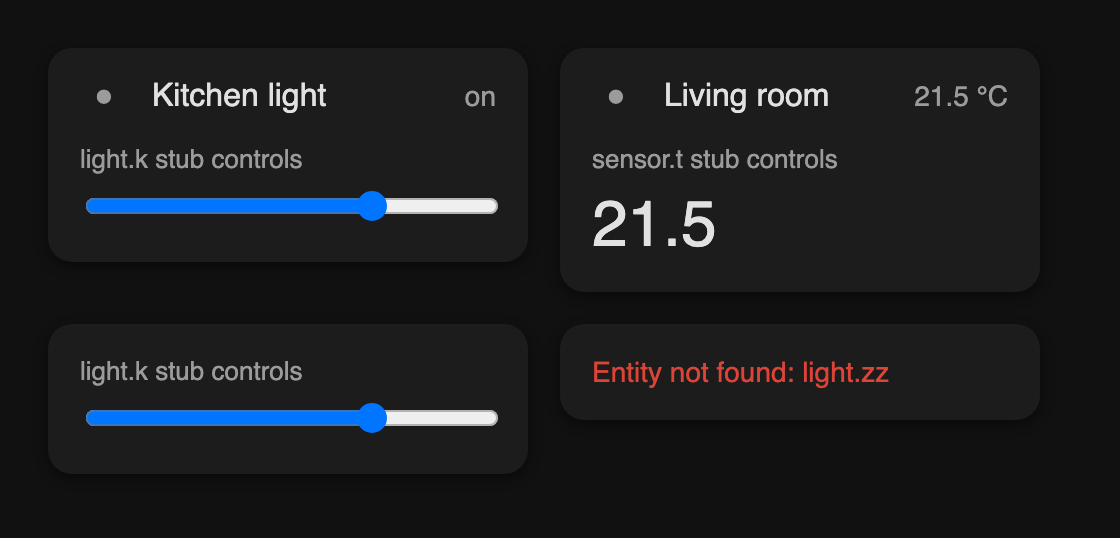
Free, MIT licensed. Version 1.0.0. Download entity-panel-card.js (9 KB)
- Download entity-panel-card.js.
- Copy it into
/config/www/dashpack/on your Home Assistant (create the folder if needed; restart once if/config/wwwdid not exist). - Turn on Advanced mode in your profile. Then Settings > Dashboards > three dots > Resources > Add resource: URL
/local/dashpack/entity-panel-card.js, type JavaScript module. - Hard-refresh the browser (Ctrl+Shift+R / Cmd+Shift+R). The card is now available as
custom:entity-panel-card.
How it works
Home Assistant's frontend registers an internal element, more-info-content, that draws the controls for an entity. This card creates that element and hands it your hass object and the entity's state. Because it is an internal element, it can change between Home Assistant releases. If it is not available after about 3 seconds, the card falls back to a plain list of the entity's state and attributes plus an "Open controls" button that opens the normal dialog.
Use
Add the card from the card picker ("Entity Panel Card") or in YAML:
type: custom:entity-panel-card
entity: light.kitchen| Option | Default | Description |
|---|---|---|
entity | required | Any entity id. |
name | friendly name | Header text. |
icon | entity icon | Header icon, for example mdi:ceiling-light. |
show_header | true | Show the icon, name and state row. Tapping it opens the more-info dialog. |
show_state | true | Show the state in the header. |
max_height | none | Maximum height of the controls area in pixels; scrolls beyond that. |
Migrating from custom:more-info-card
entity carries over. The old card's hide_* style options are not supported; use show_header: false for the bare controls. Styling via card-mod on ha-card keeps working.
License
MIT