Desk Height Card
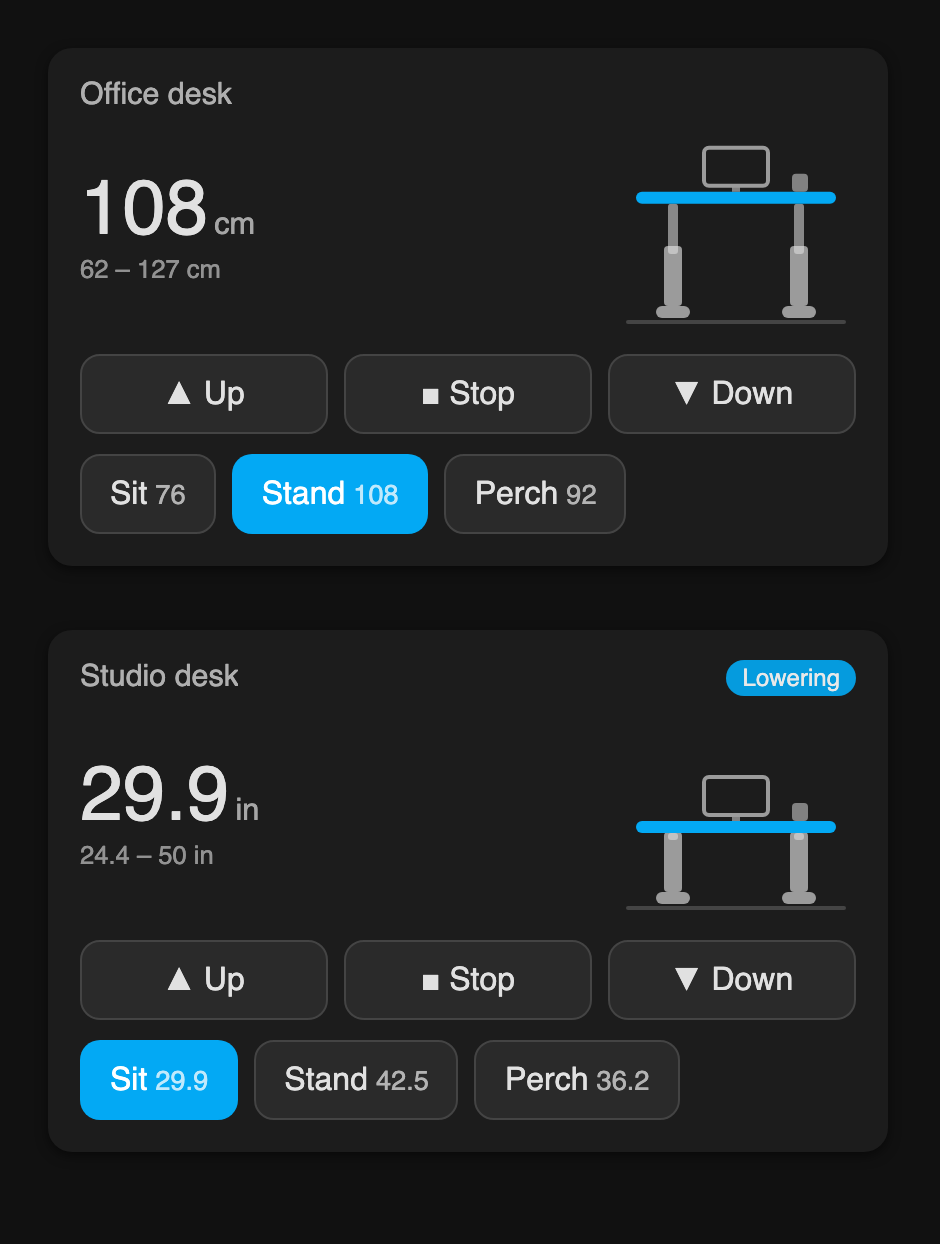
A card for motorized sit/stand desks in Home Assistant: live height, a small desk drawing that rises and lowers with it, Up / Stop / Down buttons and height presets. No dependencies, one JavaScript file, a visual editor included.
Free, MIT licensed. Version 1.0.0. Download desk-height-card.js (13 KB)
- Download desk-height-card.js.
- Copy it into
/config/www/dashpack/on your Home Assistant (create the folder if needed; restart once if/config/wwwdid not exist). - Turn on Advanced mode in your profile. Then Settings > Dashboards > three dots > Resources > Add resource: URL
/local/dashpack/desk-height-card.js, type JavaScript module. - Hard-refresh the browser (Ctrl+Shift+R / Cmd+Shift+R). The card is now available as
custom:desk-height-card.
Use
Add the card from the card picker ("Desk Height Card") or in YAML:
type: custom:desk-height-card
desk: cover.desk
height_sensor: sensor.desk_height
moving_sensor: binary_sensor.desk_moving
connection_sensor: binary_sensor.desk_connection
min_height: 62
max_height: 127
presets:
  - label: Sit
    target: 76
  - label: Stand
target: 108| Key | Description |
|---|---|
desk | Required. The desk's cover.* entity. Up, Stop and Down call cover.open_cover, cover.stop_cover and cover.close_cover. |
name | Title. Defaults to the entity name; use " " to hide it. |
height_sensor | Sensor with the current height. Its unit (m, cm, mm, in, ft) is read from the sensor. Without it, the height is estimated from the cover position and min_height / max_height. |
moving_sensor | Optional binary sensor; on shows a "Moving" badge. The cover states opening / closing show "Raising" / "Lowering". |
connection_sensor | Optional binary sensor; off (or an unavailable cover) shows "Disconnected" and disables the buttons. |
min_height, max_height | Lowest and highest height of your desk in centimeters (the height at cover position 0 % and 100 %). Needed for presets with target, the range line and the drawing. |
presets | Up to 8 buttons. Each has label plus either target (a height in cm, converted to a cover position between min_height and max_height) or position (0-100, sent as is). The preset whose height is within 1 cm of the current one is highlighted. |
unit | auto (default, follows your unit system), cm or in. Only changes what is shown; config values stay in cm. |
height_offset | Centimeters added to the sensor reading, for example when you set a custom desktop offset in the integration. Default 0. |
Presets are edited in YAML; the visual editor covers the other options and keeps your presets.
Presets move the desk with cover.set_cover_position, so they are only as exact as your desk's integration is. If the integration maps position 0-100 differently from your min_height / max_height, use position for the presets instead.
Example dashboard
A small sample view you can paste into the raw configuration editor (replace the placeholder entity ids with your own):
title: Office
path: office
type: sections
max_columns: 1
sections:
  - type: grid
    cards:
      - type: custom:desk-height-card
        desk: cover.desk
        height_sensor: sensor.desk_height
        min_height: 62
        max_height: 127
        presets:
          - label: Sit
            target: 76
          - label: Stand
            target: 108
      - type: grid
        columns: 2
        square: false
        cards:
          - type: tile
            entity: light.office
          - type: tile
            entity: climate.thermostat
          - type: tile
            entity: cover.garage_door
          - type: tile
            entity: lock.front_door
8 more ready-made views (living room, bedroom, kitchen, cameras, security, energy, mobile) are in the Home Dashboard Layout Pack ($9): https://dashpack.strahmdigital.com/
Free dashboard guides with copy-paste YAML: https://dashpack.strahmdigital.com/guides/
Coming from custom:linak-desk-card
That card (IhorSyerkov/linak-desk-card) has not had a release since 2023. It was written for an ESPHome desk controller project that has since been archived, and it was never updated for Home Assistant's own desk integration (its issue #26 asks for this; #31 reports a wrong height). This card is an independent rewrite that reuses the same option names, so most configs work after changing the card type:
- Change
type: custom:linak-desk-cardtotype: custom:desk-height-card. - Renamed or changed options:
| Old option | Here |
|---|---|
desk | desk (same) |
height_sensor, moving_sensor, connection_sensor | same names, all optional now; the height unit is read from the sensor |
min_height, max_height | same names, in cm |
presets with label and target | same, plus position as an alternative |
name | name (same) |
| (none) | new: unit, height_offset |
- Check the layout: this card is a similar but not pixel-identical design, and the drawing is new.
This project is not affiliated with the author of that card or with any desk maker.