Card Gate
Put any Home Assistant dashboard card behind a cover. To use the card underneath you first enter a password, tap "Unlock" to confirm, or just tap once. After a set time the cover comes back by itself. No dependencies, one JavaScript file, a visual editor included.
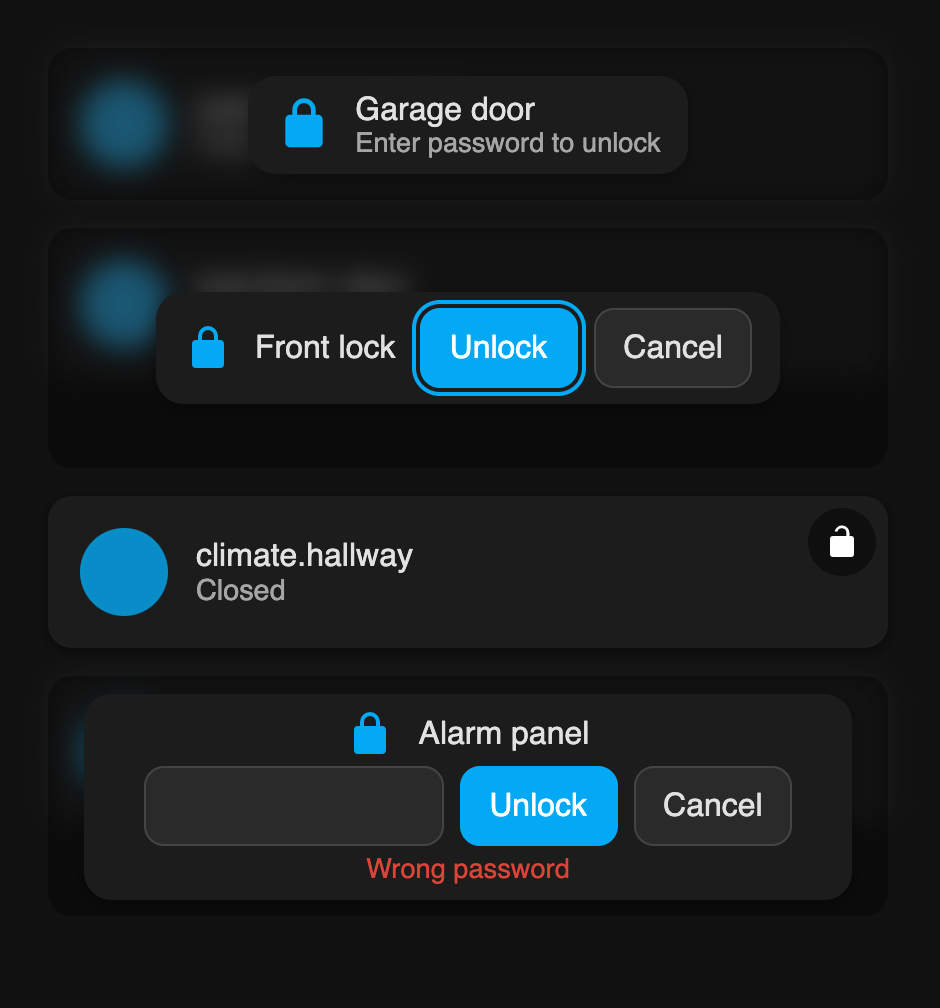
Free, MIT licensed. Version 1.0.0. Download card-gate.js (12 KB)
- Download card-gate.js.
- Copy it into
/config/www/dashpack/on your Home Assistant (create the folder if needed; restart once if/config/wwwdid not exist). - Turn on Advanced mode in your profile. Then Settings > Dashboards > three dots > Resources > Add resource: URL
/local/dashpack/card-gate.js, type JavaScript module. - Hard-refresh the browser (Ctrl+Shift+R / Cmd+Shift+R). The card is now available as
custom:card-gate.
Use
type: custom:card-gate
title: Garage door
mode: pin
password: "1234"
relock_after: 30
card:
  type: tile
  entity: cover.garage_door
Any card works inside, including cards that other custom cards provide (map, markdown, stacks, picture-elements). The inner card is created once and kept, so its state is not lost when the gate locks and unlocks. While locked it is blurred and cannot be clicked, tabbed to or read by a screen reader.
| Option | Default | Meaning |
|---|---|---|
card | required | The card to guard (any card config with a type). |
cards | A list of cards instead of card; shown as a vertical stack. | |
mode | pin | pin: password box. confirm: tap, then press Unlock. tap: one tap unlocks. |
password | required for pin | The password. Numbers are fine (1234). code is accepted as another name. |
title | "Locked" | Text on the cover. |
hint | Small text under the title (for example "Ask Dad"). | |
relock_after | 30 | Seconds of no activity until it locks again. 0 = stay open until you press the small lock button. Touching the open card restarts the timer. |
max_attempts | 5 | Wrong passwords allowed before a pause. |
lockout | 30 | Seconds the password box is disabled after too many wrong tries. |
When unlocked, a small round lock button in the corner of the card locks it again right away.
Example dashboard
title: Wall tablet
views:
  - title: Home
    sections:
      - type: grid
        cards:
          - type: custom:card-gate
            title: Alarm
            mode: pin
            password: "4321"
            relock_after: 20
            card:
              type: tile
              entity: alarm_control_panel.home
          - type: custom:card-gate
            title: Garage
            mode: confirm
            card:
              type: tile
              entity: cover.garage_door
          - type: custom:card-gate
            title: Thermostat
            mode: tap
            relock_after: 60
            card:
              type: thermostat
              entity: climate.hallway
8 more ready-made views (living room, bedroom, kitchen, cameras, security, energy, mobile) are in the Home Dashboard Layout Pack ($9): https://dashpack.strahmdigital.com/
Free dashboard guides with copy-paste YAML: https://dashpack.strahmdigital.com/guides/
Coming from custom:love-lock-card
That card (CyrisXD/love-lock-card) says in its README that it is not being worked on, and its last commit is from July 2024. Its open issues describe wrapped cards failing to render (hui-map-card and hui-switch-card "Custom element doesn't exist", #27, #21, #10), the Markdown card not loading (#28), "Card not showing up" (#25), no way to use it on a kiosk tablet (#18) and the lock icon disappearing after an update (#6). This card is an independent rewrite: it builds the inner card with Home Assistant's own card helpers, so any card type works. Options carry over like this (names taken from that card's README):
- Change
type: custom:love-lock-cardtotype: custom:card-gate. - Map the options:
| Old option | Here |
|---|---|
popup: password | mode: pin (the old popup name is still accepted) |
popup: confirm | mode: confirm |
popup: timeout | mode: tap plus relock_after (a tap lifts the cover, it comes back after the delay) |
password | password |
title | title |
cards (list) | cards (list) or a single card |
- Check the look: it is a similar idea but not a pixel-identical design. The old "timeout to fade" animation is not copied; the cover simply comes back after
relock_afterseconds.
Honest limits: the unlock state is kept in the page only, so a reload locks everything again. There is no per-user setting; everybody who opens the dashboard sees the same gates.
This project is not affiliated with the author of that card.
Testing
16 jsdom tests run against a mocked hass and mocked card helpers (npm test): config validation and old option names, locked and inert state, wrong and right password, lockout, confirm and tap modes, auto re-lock and activity reset, inner card created once and fed hass, stacks, inner card errors, escaping and cleanup. A headless Chrome screenshot of the test page was checked by eye (it caught the first version overflowing small cards). Not tested: a real Home Assistant instance, real touch screens, kiosk apps, and the visual editor inside the real dashboard editor.