Activity Feed Card
A Lovelace card for Home Assistant that shows one timeline of what just happened: entity changes, upcoming calendar events and persistent notifications. No dependencies, one JavaScript file, a visual editor included.
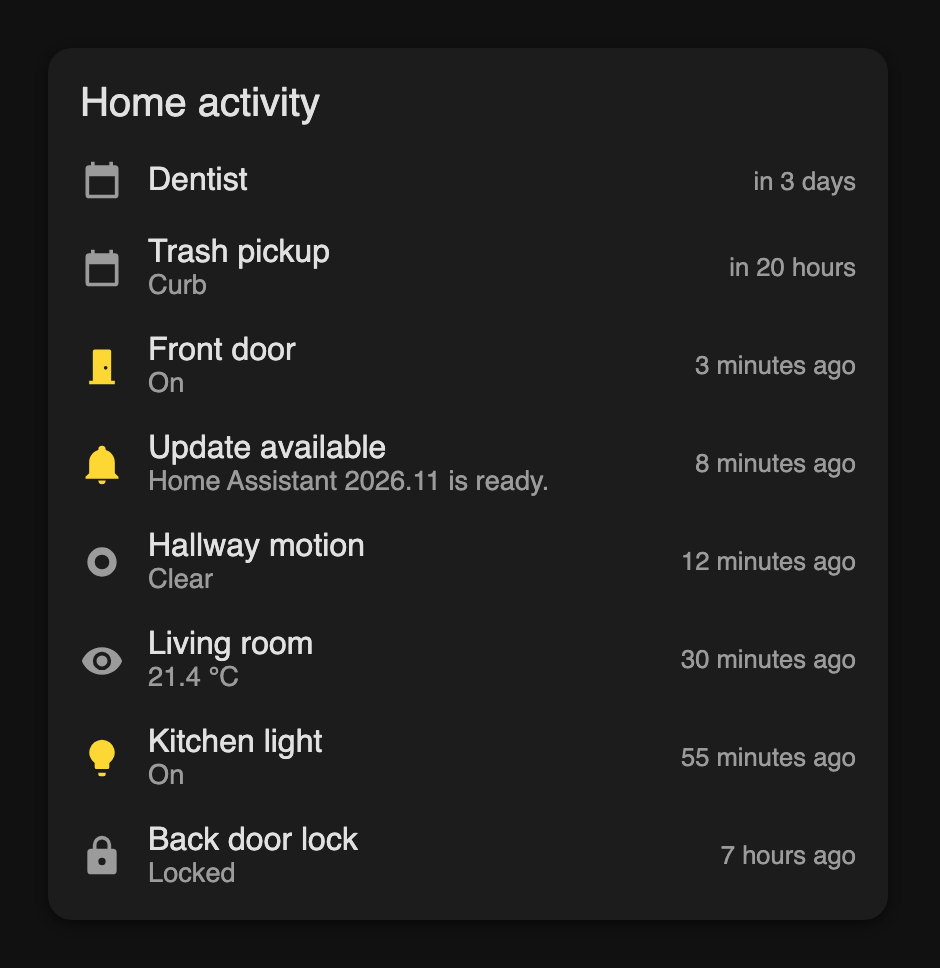
Free, MIT licensed. Version 1.1.1. Download activity-feed-card.js (22 KB)
- Download activity-feed-card.js.
- Copy it into
/config/www/dashpack/on your Home Assistant (create the folder if needed; restart once if/config/wwwdid not exist). - Turn on Advanced mode in your profile. Then Settings > Dashboards > three dots > Resources > Add resource: URL
/local/dashpack/activity-feed-card.js, type JavaScript module. - Hard-refresh the browser (Ctrl+Shift+R / Cmd+Shift+R). The card is now available as
custom:activity-feed-card.
Use
Add the card from the dashboard card picker ("Activity Feed Card") and use the visual editor, or in YAML:
type: custom:activity-feed-card
title: Home activity
entities:
  - binary_sensor.front_door
  - entity: lock.back_door
    name: Back door
    more_info_on_tap: false
calendars:
  - calendar.family
id_filter: ^binary_sensor\.motion_
max_item_count: 20
Card options
| Option | Default | Description |
|---|---|---|
title | Activity | Card title. Empty string hides it. |
entities | [] | Entity ids, or objects (see below). |
id_filter | none | Regular expression. Every entity whose id matches is added. |
calendars | [] | Calendar entities. calendar is accepted as an alias. |
days_ahead | 7 | Days ahead to show calendar events. 0 = today only (until midnight); 1 = today and tomorrow. calendar_days_forward is accepted as an alias (used only when days_ahead is not set). |
calendar_days_back | 0 | Include calendar events starting this many days before today. |
calendar_time_format | relative | relative, date, time or datetime for calendar and notification times. |
show_notifications | true | Include persistent notifications. |
notification_filter | none | Regular expression matched against notification ids. Only matching notifications are shown. |
show_notification_title | true | Set false to show only the message of a notification. |
max_item_count | 20 | Maximum rows. |
max_height | none | CSS height (20em, 300px); the list scrolls inside it. |
scrollbars_enabled | true | false clips instead of scrolling when max_height is set. |
compact_mode | false | One line per row: title and text side by side, tighter padding. |
show_icons | true | Show the icon column. |
state_color | true | Colour icons of active entities. |
more_info_on_tap | true | Tap a row to open the entity dialog. |
state_map | none | Map state values to display text for every entity, for example {on: Open}. |
show_empty | true | When false the card hides itself with no rows. |
empty_text | Nothing to show | Text for an empty card. |
Entity options (inside entities:)
| Option | Default | Description |
|---|---|---|
entity | required | Entity id. |
name, icon | friendly name, auto | Overrides. |
attribute | none | Show this attribute instead of the state. |
content_template | none | Row text, for example {{display_name}} arrived at {{state}} ({{latitude}}). Placeholders: display_name, state (after state_map), raw_state, and any attribute name. Plain text only (no Markdown or Jinja). |
state_map | none | Map states to display text, for example {not_home: Unknown destination}. |
exclude_states | none | List of states that are not shown, for example ["off", "unknown"]. |
include_history | false | Show the last states from the past 24 hours instead of only the current one (needs the recorder). unknown entries are dropped. |
max_history | 3 | How many history rows. |
remove_repeats | true | Collapse consecutive identical states in the history. |
format | relative | relative, date, time or datetime. |
more_info_on_tap | card setting | Per-entity override. |
multiple_items, list_attribute, timestamp_property, max_items | off, -, entity change time, 5 | Expand a list attribute (like a Reddit sensor's posts) into several rows; content_template uses each item's properties, e.g. {{title}}. A numeric timestamp is read as Unix seconds. |
Automations show when they last triggered (last_triggered) and are skipped if they never have. timestamp sensors use their state as the time.
Rows are sorted by timestamp, newest first. Entity rows use the entity's last_changed, notifications use their creation time, calendar events use their start time (so upcoming events sit at the top).
Example dashboard
A small sample view you can paste into the raw configuration editor (replace the placeholder entity ids with your own):
title: Front door
path: front-door
type: sections
max_columns: 2
sections:
  - type: grid
    cards:
      - type: tile
        entity: lock.front_door
      - type: tile
        entity: binary_sensor.front_door
      - type: entities
        title: Status
        entities:
          - binary_sensor.front_door_motion
          - lock.front_door
  - type: grid
    cards:
      - type: custom:activity-feed-card
        title: Recent
        entities:
          - binary_sensor.front_door
          - lock.front_door
        id_filter: ^binary_sensor\.front_door_
        max_item_count: 8
        show_icons: true
        show_empty: false
        show_notifications: false
8 more ready-made views (living room, bedroom, kitchen, cameras, security, energy, mobile) are in the Home Dashboard Layout Pack ($9): https://dashpack.strahmdigital.com/
Free dashboard guides with copy-paste YAML: https://dashpack.strahmdigital.com/guides/
Coming from home-feed-card
Change type: custom:home-feed-card to type: custom:activity-feed-card, remove the old resource and check the card. These carry over with the same names and meaning: title, entities (as ids or objects), calendars, calendar_days_back, calendar_days_forward, calendar_time_format, show_empty, max_item_count, max_height, scrollbars_enabled, compact_mode, show_icons, show_notification_title, more_info_on_tap, state_color, and per entity name, icon, attribute, content_template, state_map, exclude_states, include_history, max_history, remove_repeats, format, multiple_items, list_attribute, timestamp_property and max_items.
Differences you should know about:
id_filterhere selects entities by entity id. In home-feed-card it filtered notifications by notification id. Rename it tonotification_filterfor that purpose.more_info_on_tapdefaults totruehere (it wasfalsethere), andstate_colordefaults totrue. Set them explicitly if you want the old look.unknownis not excluded by default for current states; addexclude_states: ["unknown"]if you want that.unknownis always dropped from history rows.max_item_countdefaults to 20, not unlimited.- Not implemented, ignored if present:
card_id,exact_durations,detail_template, thetotaltime format, dismissing notifications from the card, Markdown or Jinja in templates, and the extradevice_classbased state names. - This is an independent project and not affiliated with that card.
Known limits
- The visual editor edits plain entity ids. Rows written in object form (custom name or icon) are kept in YAML; switch to the code editor for those.
- Tested with a mocked
hassobject in jsdom (37 tests) and, since 1.1.1, on a real Home Assistant 2026.11 instance in headless Chromium: persistent notifications (live subscription), a local calendar with timed and all-day events (days_ahead0 and 7),include_historyfrom the recorder,exclude_states,state_map,content_template,notification_filter,compact_mode,max_height, and the editor's config-changed output. In that headless setup Home Assistant's own entity pickers insideha-formdid not render (the same happens for a plainha-form), so the editor's pickers were not visually verified; the form wiring and emitted config were. Please open an issue if something differs on yours.
License
MIT